Verifying Your Google Business Profile in Korea: Video, Phone, Postcard and What to Expect
Google picks your verification method and doesn't publish which ones each country gets. Here's what each method does, and what to film if you land on video.

Google chooses how you verify your Business Profile, and you can't change it. Your screen may offer video, phone, email or postcard. Google doesn't publish which methods each country gets, so the only reliable view is the screen on your own profile. This guide covers each method, then gives a shot list for video, the method with the most to get right. Verification is one step in the full Google Business Profile setup guide.
Google picks the method, not you
Google says the options on your verification screen depend on your business type, public information, region and business hours, and that you can't change them. It publishes no list of methods by country.
So when a forum post or a consultant says "Korea only gets video" or "Korea never gets postcards," treat it as a guess. Two shops can see different options.
The methods, one by one
Phone or text. Google sends a code by call or text. Google says automated menu systems (IVR) won't get the code, so if your landline answers with a recorded "press 1 for…" menu, make sure the business number on your profile reaches a person or can take texts before you choose this method.
Email. Google sends steps to the email address shown on your verification screen, so make sure you can open that inbox.
Live video call. You show Google your location and proof that you run the place on a live call. Calls happen only during your business hours, you must be on site, and Google says it may not be offered to every business.
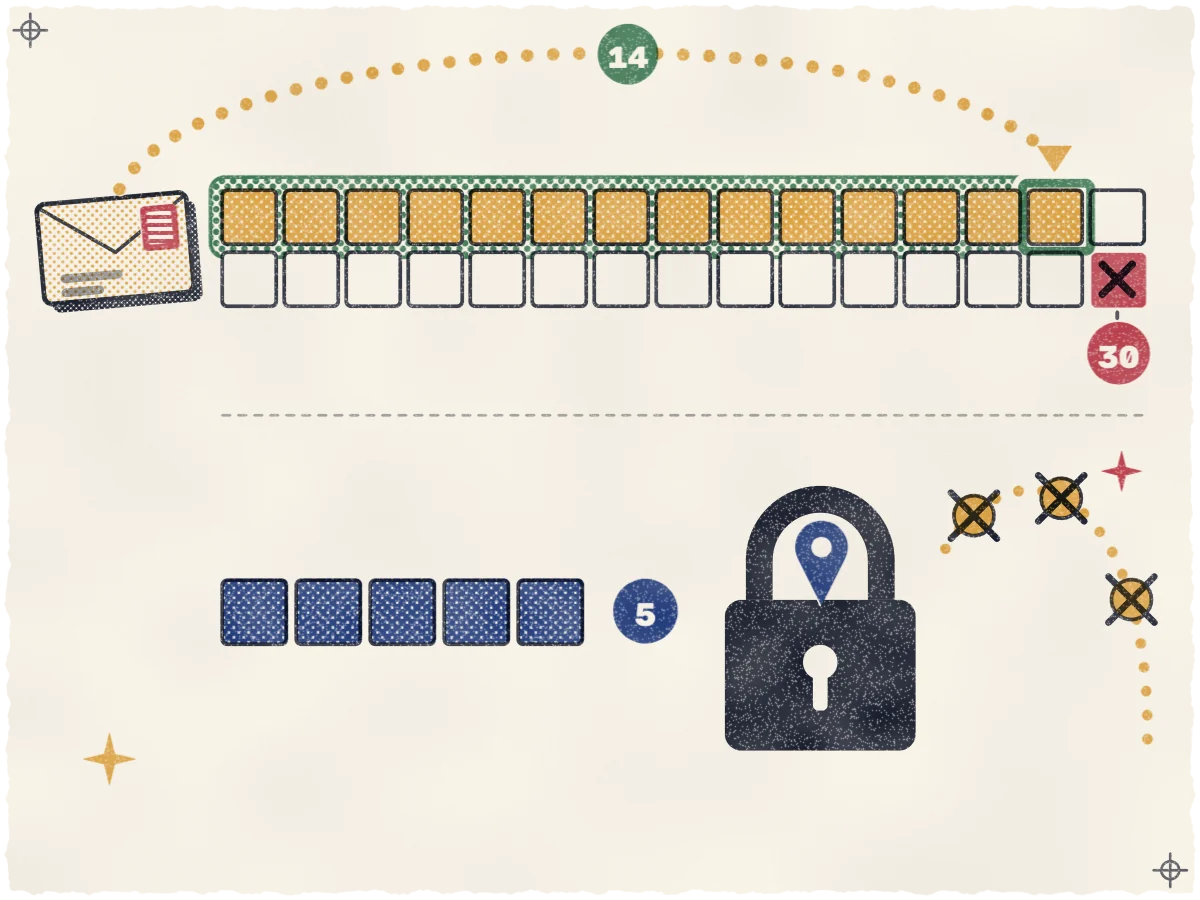
Postcard. Google mails a five-digit code to the address on your profile. Most codes arrive within 14 days, and the code expires after 30. Don't request a second code: Google cancels the one in the mail. Google also says postcards aren't available for all businesses. If your screen has no postcard option, Google isn't offering one to your profile, and it doesn't say why.
Video recording. You film a short clip on your phone and upload it through your profile. Google recommends this method when you're eligible.
Instant. Google says it sometimes verifies a profile instantly, for example when you've verified your website in Google Search Console or use bulk verification. It doesn't say who qualifies.
Video verification, shot by shot
Google's rules for the recording are firm. It must be live, unedited and continuous, at least 30 seconds long, filmed on a mobile device and uploaded from your Business Profile. You can't record offline and upload later, and you can't use pre-recorded footage. Keep bank numbers, tax numbers, ID numbers and other people's faces out of frame. If video gives you trouble, Google says to check the requirements and try again, then try another method your screen offers, before you contact support.
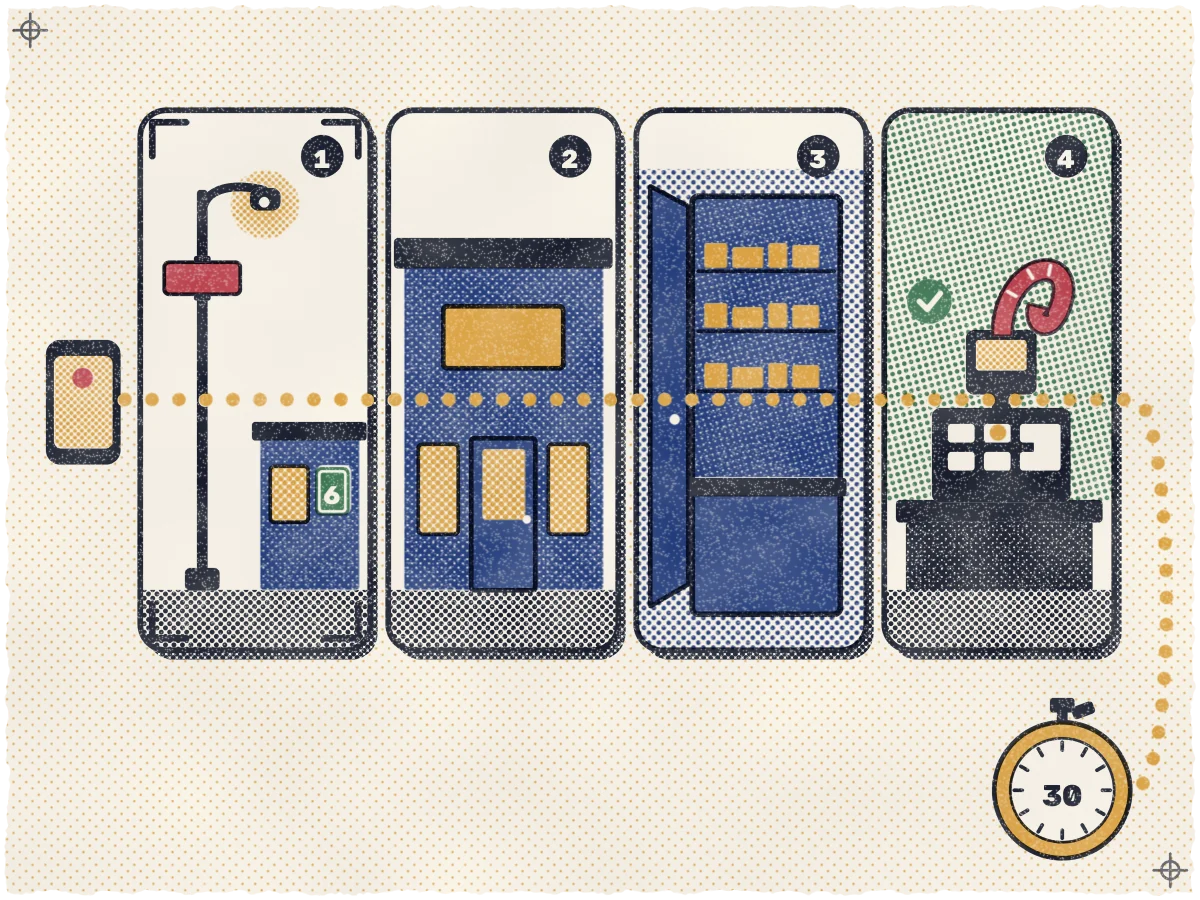
Our suggestion: film on a day you're open, with the lights on. Google wants proof that you run the place, and a register in use shows more than a closed shutter. Then shoot it as one take:
- The street. Start outside, a few steps from the door. Show the road-name sign on the corner or lamp post, a neighbor's shopfront or a landmark, then the building-number plate near the entrance.
- Your sign. Pan to the signboard or door lettering. Google wants the business name on a permanent fixture, and the name has to match your profile.
- The doorway. Walk through the door without cutting. Show the counter, the menu board or the shelves, so the reviewer sees a working business.
- Proof you manage it. Show something only staff can reach: ring up a test sale on the register or POS, walk into the kitchen, open the storage room or step behind the counter.
If a step fails, Google marks the result "not successful" and lists the reasons. Tap Review issues in your profile and record a new video. The new one must include everything from the first plus what was missing.
If you share a building with other tenants
Say your café is on the third floor of a building with a dozen tenants. The plate at the main entrance shows the building number, not your shop, so the reviewer has to follow you upstairs. Our suggestion: after the plate, film the lobby directory if it lists your name, then the elevator button or stair landing showing your floor, the hallway, and your door sign. Then go inside. Keep it all in one take. This route is our advice, not a Google script.
Service-area businesses
Tour guides, mobile services and other businesses that go to the customer follow a different shot list, still in one take. Show street signs or landmarks at your business address. Home-based businesses can film signs and landmarks in the surrounding neighborhood. Then show proof the business exists, such as tools, equipment, products, business cards or branded clothing. For proof you manage it, do part of the work on camera or open a branded vehicle. A permit, invoice or utility bill that matches your profile name also works.
Watch the numbers. A Korean business registration certificate (사업자등록증) shows a registration number, and Google tells you to keep tax numbers out of the video. Our reading: pick an invoice or permit without such a number, or keep the number out of frame. Online-only businesses are not eligible for a Business Profile or for video verification.
Korean details to prepare
The road-name address. Google's bulk-upload address help lists South Korea's sub-locality as "District," with Bundang-gu as its example, and the administrative area as "Do/Si." It asks for the official postal address format. Google gives no Seoul example, and the fit isn't obvious: Bundang-gu sits inside Seongnam-si, while a Seoul gu like Gangnam-gu sits directly under the city. Don't assume the gu goes under District. Fill each field as the form or template shows it, using your official postal address. Copy the road name and building number exactly as they appear on your registration.
Floor and unit. Google's guidelines allow floors and suite numbers in the address, and say to put the street address in Address Line 1 and the suite number in Address Line 2. So: road name and building number on line 1, floor and unit on line 2. Our advice is to write both the same way everywhere you list the address. That also helps a postcard find your door. Google doesn't accept P.O. boxes, mailboxes at remote locations or rented virtual-office addresses, only a place where you operate.
A Hangul sign that matches. Google says your profile name should match the name on your storefront, and that a business showing its address should keep permanent signage with its name. Our inference: a reviewer compares the sign in your video to the name on your profile, so a Hangul-only sign over an English-only profile name invites a rejection. How to write the name is covered in making your profile name match your sign.
Before you film, read your profile name aloud, then read your sign. If they differ, fix that first, then verify.
While you wait
Don't edit your name, address or category. Google's help says not to touch them while a postcard is in the mail, and that when it asks for more details, it's likely because you recently changed business information. A review takes up to 5 business days, and on rare occasions longer. If it runs long, check your profile for a Review issues notice before you change anything.
If it's rejected or suspended
A "Get verified" button that comes back means Google couldn't fully verify you. Try again, or try another method if your screen offers one. For a rejected video, follow the Review issues steps above.
Then check that the address on your profile matches the address on your official registration. One Korean owner on the Local Search Forum reported a suspension after moving and entering their new address in a different form from the one on their government registration. Google never named a cause, and a former tenant's listing was still live at the same address. They switched to the registered form and asked Google to restore the profile. Google pointed them back to their earlier request, and the thread doesn't record the outcome. It's one report, not a rule, but matching costs you nothing.
If Google suspends the profile, use its appeals tool. Google suggests evidence such as your business registration, a business license, tax certificates or utility bills showing the same name and address as the profile. Google allows one appeal through the appeals tool. If it's denied, you may be able to ask for an additional review with new evidence through its contact form. Google says not to create a new profile for the same business.
Can someone do this for you? Google doesn't say who has to film, but the video must be shot live at your location and uploaded from a phone signed in to your profile, so in practice it's you or your staff. We walk owners through this shot list, then join the verified profile as a manager and look after it from there.
After you're verified
Verification gets you onto the map. Whether you show up above the shop two blocks over is a separate question, covered in what decides where you show up after verification. Why your Google listing matters to visitors explains why it pays to get this right.
A verified profile is also the base for the work that gets visitors to pick you: categories, an English description, photos and review replies. Nobody can promise a ranking, and our answers to common questions explain why. To see where you stand today, request a free visibility map of how you rank across your neighborhood right now.
Sources
- Google Business Profile Help: Verify your business on Google
- Google Business Profile Help: Verify your business with a video
- Google Business Profile Help: Guidelines for representing your business on Google
- Google Business Profile Help: Understand address formats for bulk uploads
- Google Business Profile Help: Fix suspended or disabled profiles
- Local Search Forum: My GBP got suspended after changing address and they declined two times of my request